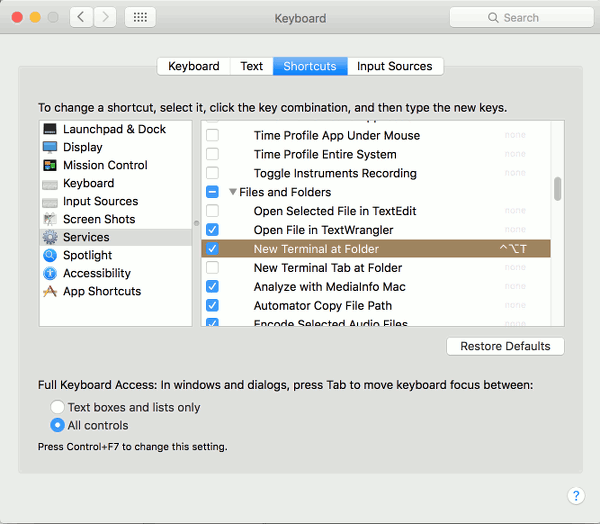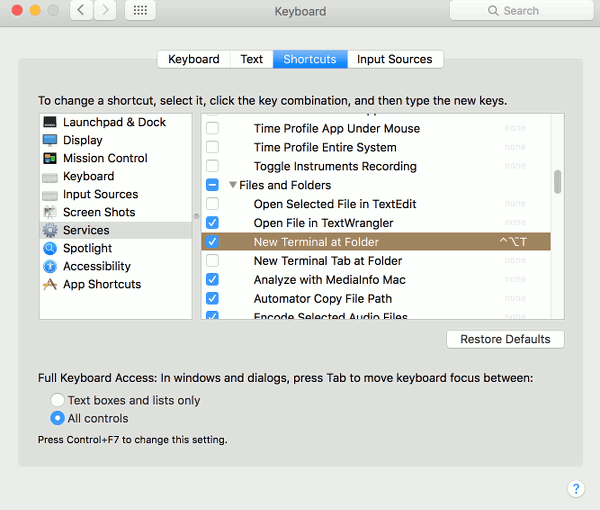
DS TECH OSX – Open Current FOLDER / LOCATION in terminal (ala Linux) ~~ May 3, 2016 System Preferences >> >> Keyboard >> >> Shortcuts >> >> Services >> >> [x] New Terminal at Folder – Enable and set keyboard shortcut. Linux typical: CTRL+ALT+T Related Posts:Arch Linux on Macbook Pro Retina - Wifi enableArch Linux on MacBookProRetina - Kernel 4.2.1.1…OSX: Set any password via terminalOSX Terminal "beep" / "bell" / etc...OSX system volume (sound) GET / SET via Terminal / bashbash: for - looping over and processing files in…bash OSX iTerm2 - display inline images in terminalLinux Terminal - hardware sensor readout temp - UbuntuAcer Aspire R 11 (R3 131T) - Linux install - Mint…